EdgeCraft discount guides / Articles
What can Shopify's built-in discounts do, and when do you need a discount app?
Published
Short answer: Shopify's built-in discounts cover most single-rule promotions: money or a percentage off products or the order, buy X get Y, and free shipping, as codes or automatic, with a minimum, customer and market eligibility, and dates. An app earns its place when you need several tiers in one discount, a message the shopper sees before checkout, wholesale rates by customer tag without B2B, or a rule Shopify's form has no field for. If none of those is you, you don't need one.
EdgeCraft, the discount app named on this page, is made by the author of this page. The page says where you don't need it.
Last checked against Shopify's help center, changelog and admin: 2026-11-21. Shopify changes its help pages without dating them, so check the linked page before you rely on a limit.
What Shopify's discounts do well
Shopify's Create discount menu offers four types: Amount off products, Buy X get Y, Amount off order and Free shipping. Each can be a discount code the customer enters, or an automatic discount that's applied in the cart and at checkout once the customer qualifies (see Automatic discounts).
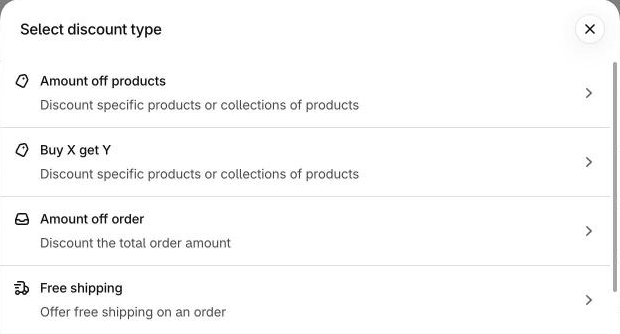
On the amount off page, the value is a percentage or a fixed amount, and you can also set:
- A minimum requirement: a minimum purchase amount or a minimum quantity of items. The amount counts product prices only, not shipping or taxes.
- Eligibility: all customers, specific customers, customer segments, or markets.
- Combinations: which other discount classes it can combine with.
- Active dates: a start date and an optional end date, in the store's time zone. A code without an end date doesn't expire.
- Usage limits on a code: a total number of uses, and one use per customer.
Buy X get Y lets the customer buy a minimum quantity or amount of chosen products or collections and get items at a percentage off, an amount off each, or free, with an optional maximum number of uses per order. Free shipping takes a minimum purchase amount or quantity, all or selected countries, and can exclude shipping rates over a set amount.
None of this needs an app. For one offer with one rule ("10% off orders over $100", "free shipping over $50", "buy 2 get 1 free"), the built-in form is the natural tool.
The limits that apply to every store
These come from Shopify, so an app doesn't remove them.
- 25 active automatic discounts. Shopify's page says: "You can have a maximum of 25 active automatic discounts. This total includes app-based discounts." (Automatic discounts, Combining discounts)
- Codes per order. A customer can use up to 5 product or order discount codes and 1 shipping discount code on one order.
- Combining is set on each discount. Several discounts apply to one order only when the setting on each of them allows it. When they can't combine, Shopify applies the best discount for the customer's cart.
- Some combinations need an eligible store. Product discounts with order discounts, and order discounts with other order discounts, are for eligible stores only; among the requirements, the store must not use any checkout.liquid customizations or features. Several product discounts on the same line item need Shopify Plus. Two shipping discounts can't apply to one order.
- One minimum per discount. The admin's minimum purchase requirement is one choice: no minimum, a minimum purchase amount, or a minimum quantity of items. Shopify's help page describes no way to set several thresholds in one discount.
- Automatic discounts and the post-purchase page. Shopify's pages say automatic discounts created in the admin don't apply to the post-purchase page at checkout.
Promotion by promotion
"Native" below means what Shopify's own help pages and admin show, read 2026-11-21. "Not described" means the page doesn't describe it; it doesn't mean the feature can't exist. The last column gives the EdgeCraft type's minimum plan only.
| Promotion | Native Shopify | What an app adds | EdgeCraft type and plan |
|---|---|---|---|
| Spend tiers ("$100 gets 5%, $200 gets 10%") | Partly. One automatic amount off order discount per tier, each with its own minimum purchase amount. Several thresholds in one discount are not described | One discount holding the whole ladder, and a cart progress bar that shows what's left to reach the next tier | Tiered spend discount, Free (3 tiers on Free, up to 10 on Starter and up). Guide |
| Free shipping over an amount | Yes. A free shipping discount with a minimum purchase amount, countries and rate exclusions | A cart bar saying how much is left to spend. Convenience, not capability | Free shipping over threshold, Free, with the cart progress bar on Free. Guide |
| Quantity breaks / volume pricing | Partly. An amount off discount can require a minimum quantity of items (3 or more, 10% off); several breaks in one discount are not described. Volume pricing with price breaks is in B2B catalogs, for B2B customers | Several breaks on one product or collection in one discount, and a ladder shown on the product page | Quantity breaks, Free; per-collection volume and bulk unit pricing, Starter |
| Buy X get Y | Yes. Buy a quantity or amount, get items free, a percentage off or an amount off each, with a maximum per order | A reward offer in the cart; only convenience if your offer is simple | Buy X get Y free and percent off, Free |
| Gift with purchase | Partly. Buy X get Y can make the item free, but Shopify's page says the free or discounted item "is never automatically added to the cart": the customer adds it | Tells the shopper in the cart that they've earned the gift, and adds it in one click | Gift with purchase, Starter |
| Customer-tag or VIP pricing | Yes, with a segment. A customer segment can filter on a tag (customer_tags CONTAINS 'VIP'), and a discount can be limited to that segment. Shopify notes that a tag change can take a short time to reach segment membership | The tags typed into the discount itself, and a prompt that tells signed-out shoppers to sign in (the prompt is on Starter) | VIP customer discount, Free |
| Wholesale / B2B | Yes, on B2B. B2B catalogs support percentage adjustments, fixed prices, quantity rules and volume pricing. Basic, Grow and Advanced get up to 3 active catalog assignments across active B2B markets; the 3-assignment limit doesn't apply on Plus, and only Plus can assign catalogs directly to company locations | A discount by customer tag for stores that don't use companies and catalogs; a discount per company location | Wholesale (tag-based), Pro; B2B company discount and company-location pricing, Pro, need B2B on Shopify |
| First-order discount | Yes, with a segment. Shopify's default segment "Customers who haven't purchased" filters on number_of_orders = 0, and a discount can be limited to a segment | A first-order offer without building a segment, and a sign-in prompt for signed-out shoppers (the prompt is on Starter) | First-order welcome offer, Free |
| Country or market discount | Yes, by market. A discount can be assigned to B2B, country or region, and retail markets. Fixed amounts are converted to the customer's currency at checkout | A country list or market list in the discount itself, and a banner for the market | Country-specific and market-based discounts, Growth |
| Scheduled sale | Yes. Active dates with a start and an optional end, in the store's time zone | Flash, seasonal, sitewide and clearance forms with exclusion lists and badges. Convenience unless you need the exclusions or badges | Flash sale, sitewide sale, seasonal, clearance: Growth |
Where native is a "Yes", the honest reading is that you can stop here. Free shipping over an amount, buy X get Y, a dated sale, and a discount for a segment or a market all work with the built-in forms.
Sources for the native column: amount off, buy X get Y, free shipping, segment filters, creating segments, B2B catalogs and discounts in Markets.
What changed since 2024
What Shopify's pages say now, where older figures may still be in circulation:
- The cap on automatic app discounts was raised. Shopify's changelog of 2024-11-19 says it increased the number of active automatic app-based discounts per shop, from a limit of 5. Today's help pages give one cap of 25 that native and app discounts share.
- Native B2B is available beyond Shopify Plus. The changelog of 2026-04-02 lists company profiles, payment terms, volume pricing and up to 3 active B2B catalogs, assigned through Markets, for Basic, Grow and Advanced. More than 3 catalogs and direct catalog assignment to companies and locations remain on Plus.
- More than one automatic discount can apply to an order. Shopify's combinations page says up to 25 automatic discounts can apply to the same order, when each one's setting allows the combination. Which combinations your store can use depends on its eligibility.
What to check before installing any discount app
These questions are for any app, ours included. A good answer to each is something you can check in your own store.
- Does the discount appear in Shopify's Discounts list? Shopify notes that some apps let you manage discounts in your Shopify admin and others in the app's own settings. One that lives somewhere else is harder to audit and to switch off.
- Does it edit your product prices? Editing prices changes your catalog and has to be undone on removal.
- Does it ask you to paste theme code? Ask what happens to that code when you remove the app.
- What happens on uninstall? Read what stays in the theme and what happens to the discounts.
- Does the display read the same threshold as the discount? A bar with its own typed-in number can disagree with the discount. Change the discount, then look at the cart.
- What are the free plan's limits, and do they renew monthly? Count active discounts, discounted orders, and features per plan.
- Is anything gated by your Shopify plan? Some features need Shopify Plus or B2B.
- Does it count against the 25? An app's automatic discounts count toward Shopify's cap of 25. An app with its own limit on top should say so.
Where EdgeCraft fits
EdgeCraft is a discount app for Shopify with 49 discount types. It fits where Shopify's form stops, and only there:
- One discount instead of one per tier, with a cart progress bar that shows what's left to the next tier: tiered discounts on Shopify.
- A progress bar for free shipping, so shoppers see how far they are: free shipping progress bar.
- Wholesale prices by customer tag, for stores that don't use B2B companies and catalogs: wholesale tag discount.
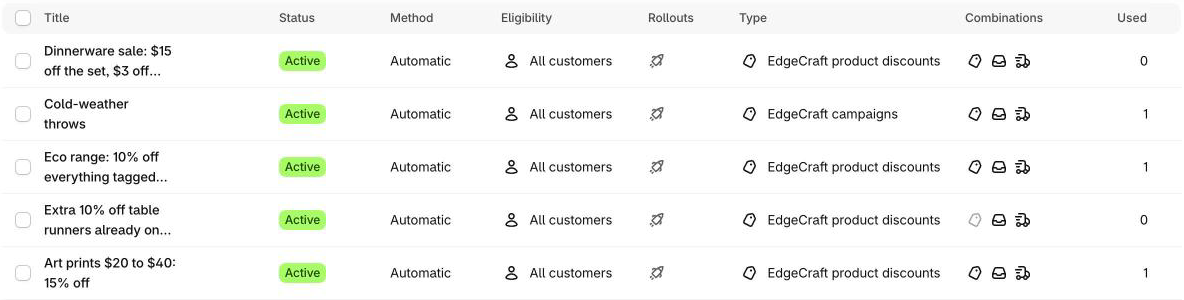
How it works: its discounts are Shopify discounts, so each one is a row in your Discounts list.
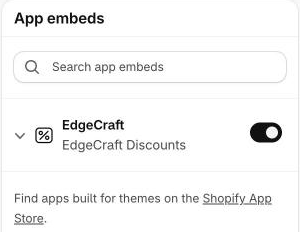
EdgeCraft edits no product price and asks you to paste no theme code. What it shows before checkout comes from an app embed and blocks you switch on in the theme editor (Add EdgeCraft to your theme).
New discounts are created switched off, and switching one off in EdgeCraft stops it. Shopify's Discounts list can keep showing a switched-off EdgeCraft discount as Active, because EdgeCraft stops it applying itself (FAQ), so read the cart, not the badge.
Plans: the Free plan allows 3 active discounts and 50 discounted orders a month, and includes the types marked Free above and the cart progress bar. Starter, Growth and Pro add types as marked, each with a 14-day free trial. Pro adds no EdgeCraft limit on discounts or orders; Shopify's cap of 25 active automatic discounts still applies. Features that need Shopify Plus, or B2B on Shopify, say so.
FAQ
Does a discount app get around Shopify's limit of 25 automatic discounts? No. Shopify's page says the 25 includes app-based discounts. An app can reduce how many you use, for example by holding a whole tier ladder in one discount, but it can't raise the cap.
Will an app slow my store? This page makes no claim either way, because it varies by app and theme. What EdgeCraft adds to the storefront is an app embed and blocks, which you switch on in the theme editor.
Can I go back to Shopify's own discounts later? Yes. Switch the EdgeCraft discount off and uninstall; because EdgeCraft edits no prices, there are no prices to restore. Blocks you added to your theme stay listed in the theme editor, marked as not found, until you remove them.
Do I need Shopify Plus for wholesale? Not for Shopify's own B2B features since 2026-04-02 (Basic, Grow and Advanced get up to 3 active catalogs; see above). EdgeCraft's tag-based wholesale discount needs neither Plus nor B2B, and is on the Pro plan.
Which should I use? If your promotion is one rule, use Shopify's. If you'd need several discounts to model one idea, or shoppers should see their progress before checkout, an app can save work. Neither choice locks you in. The EdgeCraft FAQ and changelog cover the app in more detail.
Install EdgeCraft free
If one of the gaps above is yours, you can try the app on the Free plan: Install EdgeCraft free.