EdgeCraft discount guides / Articles
How do I add a free shipping progress bar on Shopify?
Published
Short answer: Shopify's own free shipping discount handles the discount itself: set a minimum purchase amount and the countries. It doesn't show the shopper how close they are. A cart message can do that, but it has to read its threshold from the discount. If you type the number in twice, the two copies can drift apart. This guide covers the native setup first, then the cart message.
Last checked against Shopify's help center and admin: 2026-11-21.
EdgeCraft, the app used in the second half, is made by the author of this page. The first half doesn't need it.
Set up free shipping over an amount in Shopify
You need no app for the discount.
- In your Shopify admin, go to Discounts, then select Create discount.
- Select Free shipping.
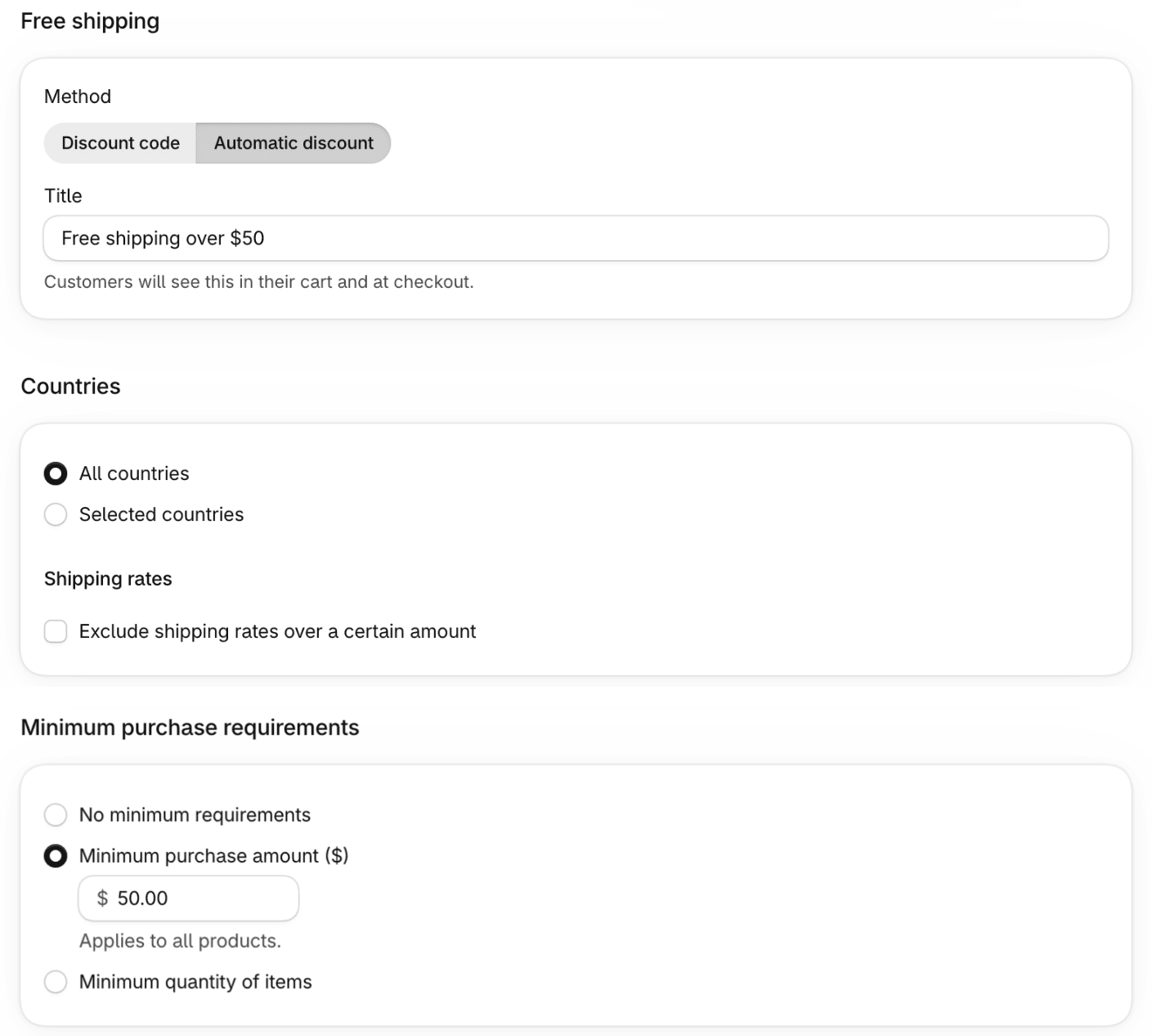
- Under Method, select Automatic discount. (A discount code also works, but then shoppers have to type it.)
- Enter a Title, for example
Free shipping over $50. The admin notes that customers see it in their cart and at checkout. - Under Countries, leave All countries or choose Selected countries.
- Optional: under Shipping rates, tick Exclude shipping rates over a certain amount to keep the offer off expensive rates, such as express. Shopify's help page says this applies to shipping rates only and is unrelated to the order amount.
- Under Eligibility, leave All customers, or limit it to specific customers, customer segments or markets.
- Under Minimum purchase requirements, select Minimum purchase amount ($) and enter
50. Shopify counts product prices only; taxes and other costs aren't included. If a product discount that combines with it has lowered a price, the lower price is what counts. (Minimum quantity of items is the other option.) - Under Combinations, add the classes it may combine with. A new discount combines with nothing, so if you also run product or order discounts, add them here; when discounts can't combine, Shopify applies the one that's best for the cart.
- Check the start date under Schedule, then select Save.
Check it before you rely on it: put a cart just over $50 through to the shipping step at checkout, then one just under. On our demo store, with the discount above and two rates (Standard $8, Express $15):
| Cart subtotal | Shipping at checkout |
|---|---|
| $49 | Standard $8.00, Express $15.00 |
| $58 | Standard and Express both free |
Without the rate exclusion, Shopify's discount makes every rate free, express included.
What the shopper sees
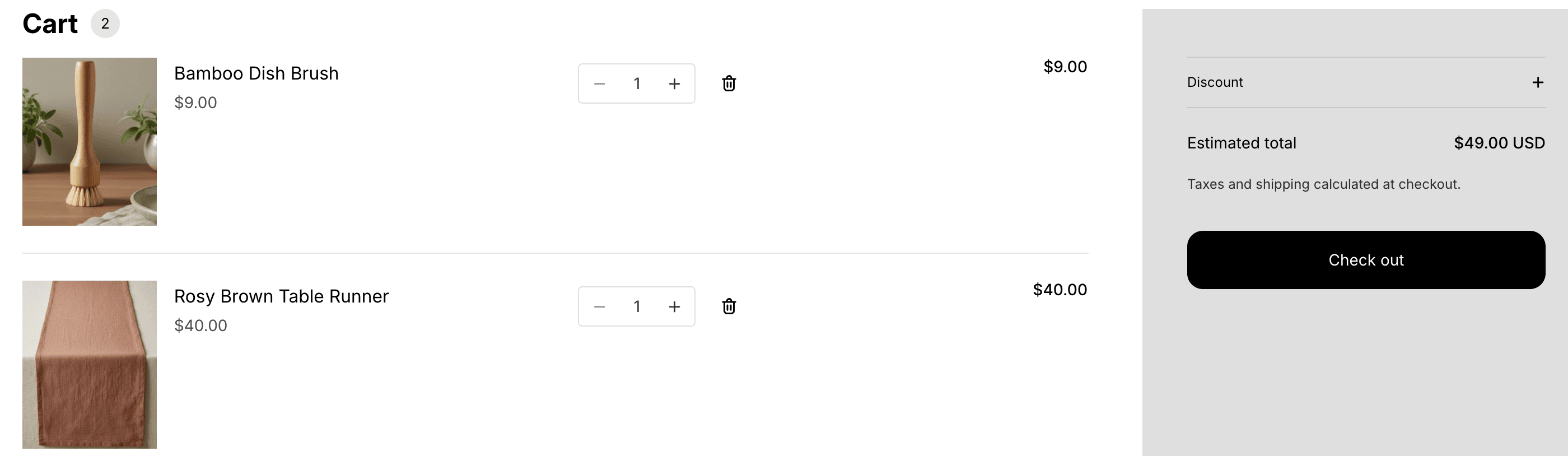
Below the threshold, the cart says nothing about free shipping. On our demo store's Horizon cart page, a $49 cart showed the items and an estimated total, and nothing about being $1 away.
Why the cart needs to say how far away it is
A free shipping threshold only changes what a shopper adds if they know it exists and how far they are from it. A shopper who learns about the offer at the shipping step has already chosen their items. A message in the cart puts the number in front of them while they can still add something. That is the reason for the message, not a promise about results.
Three ways to show progress, and what each costs
| Way | What it needs | The catch |
|---|---|---|
| Theme setting | A theme with a free shipping notice in its settings | Dawn and Horizon have none (both theme editors checked on 2026-11-21). Their announcement bar can carry the offer as text, but you type the threshold in separately from the discount |
| Code snippet | Liquid and JavaScript added to your theme, plus an update each time the cart changes | You maintain it, and the cart drawer needs its own handling. It's also a second copy of the threshold |
| An app | An app that places the bar for you | Only worth it if the bar reads the threshold from the discount |
The risk that runs through all three is the same: two numbers to keep in step. Change the discount to $75 and leave the bar saying $50, and the bar promises free shipping that checkout won't give. Currency has the same problem: a threshold typed in your shop's currency may not mean the same spend to a shopper paying in another.
Where Shopify's built-in tools stop
The discount is fully native. Where it stops:
- No progress display. Shopify's free shipping help page describes none, and neither Dawn's nor Horizon's theme editor has a free shipping setting in its cart options or cart blocks.
- Any separate bar keeps its own copy of the threshold, as above.
- Currency. A threshold typed for one currency has to be converted for the others by whatever draws the bar.
- Which rates go free. The native form lets you exclude rates over a set price. It has no option to make only the cheapest rate free, or to name the rates that qualify.
If you only need the discount, stop here: the native route serves you.
Do it with EdgeCraft
EdgeCraft is a Shopify app. Its free shipping discount is a normal Shopify discount, listed in your Discounts list. It edits no product price and asks you to paste no theme code. The cart progress bar reads the active discount and rebuilds itself when you change it, so for the discounts it can show there is one threshold to maintain.
Plan: Free shipping over threshold and the cart progress bar, including the free shipping goal, are both on the Free plan. Free allows 3 active discounts and 50 discounted orders a month. Paid plans allow more, each with a 14-day free trial.
Create Free shipping over threshold
- In EdgeCraft, select Create discount, then, under Shipping, Free shipping over threshold.
- In Campaign, enter an internal Title. Shoppers don't see it; the line under it shows the label they see at checkout. The default is "Free shipping".
- In Conditions, enter the Spend threshold in your store's currency. It must be greater than 0.
- Optional: under What counts toward the threshold, choose Excluded products and Excluded collections that shouldn't count. Gift cards never count.
- In Shipping rates, choose what Free shipping applies to:
- All shipping rates: every rate in each shipment. This keeps working if you rename a rate.
- Cheapest shipping rate only: the lowest-priced delivery rate in each shipment. Local pickup and pickup points are skipped.
- Specific shipping rates: only the rates you name. Type each name as it appears in Settings → Shipping and delivery, then select Add. "Standard" doesn't match "Standard Shipping".
- In Combinations, choose what it can combine with. Shipping discounts are off by default, so this offer doesn't compete with another shipping discount.
- Set Active dates, check Summary, then select Save.
- The discount is created switched off. Turn on Enabled in the Status card and select Save to make it live.
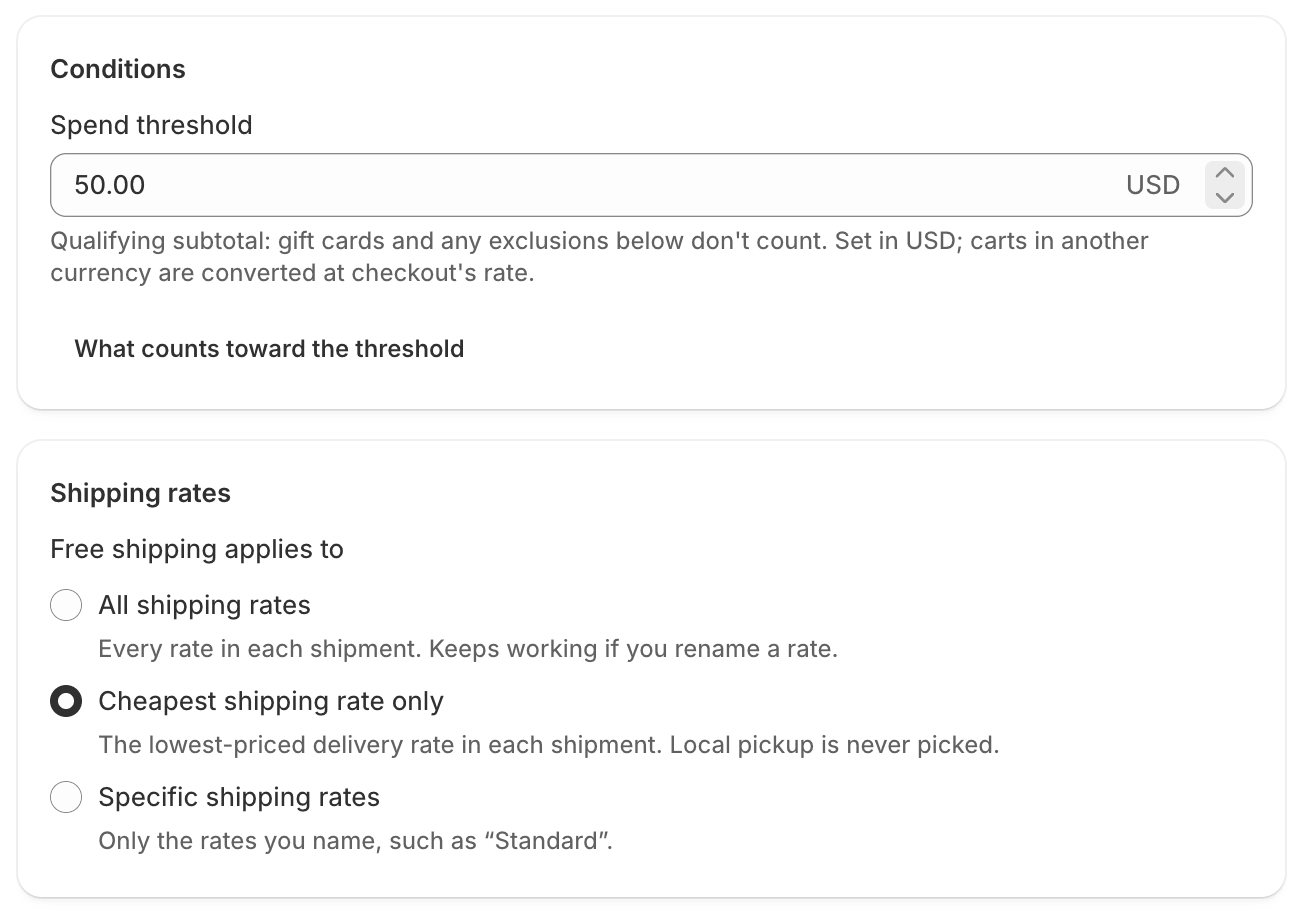
The threshold is checked once for the whole cart, even across several shipments. The full steps are in the Free shipping over threshold guide.
The progress bar reads the discount
- Go to Settings. Under Cart progress bar, turn on Show the progress bar.
- Write the Message while the buyer is short and the Message once they've earned it. Use
{amount}for what's left to spend and{reward}for what they unlock. - Under Storefront, select Turn on app embed. The theme editor opens with EdgeCraft switched on; select Save there. The bar places itself in the cart drawer and cart page of the Dawn and Horizon theme families; on other themes it goes above the cart subtotal, or you place the EdgeCraft progress bar block. You edit no theme code.
- Select Save on the Settings page.
App embeds are off after install and an app can't switch them on for you, so step 3 is yours. The Settings guide and Add EdgeCraft to your theme cover both screens.
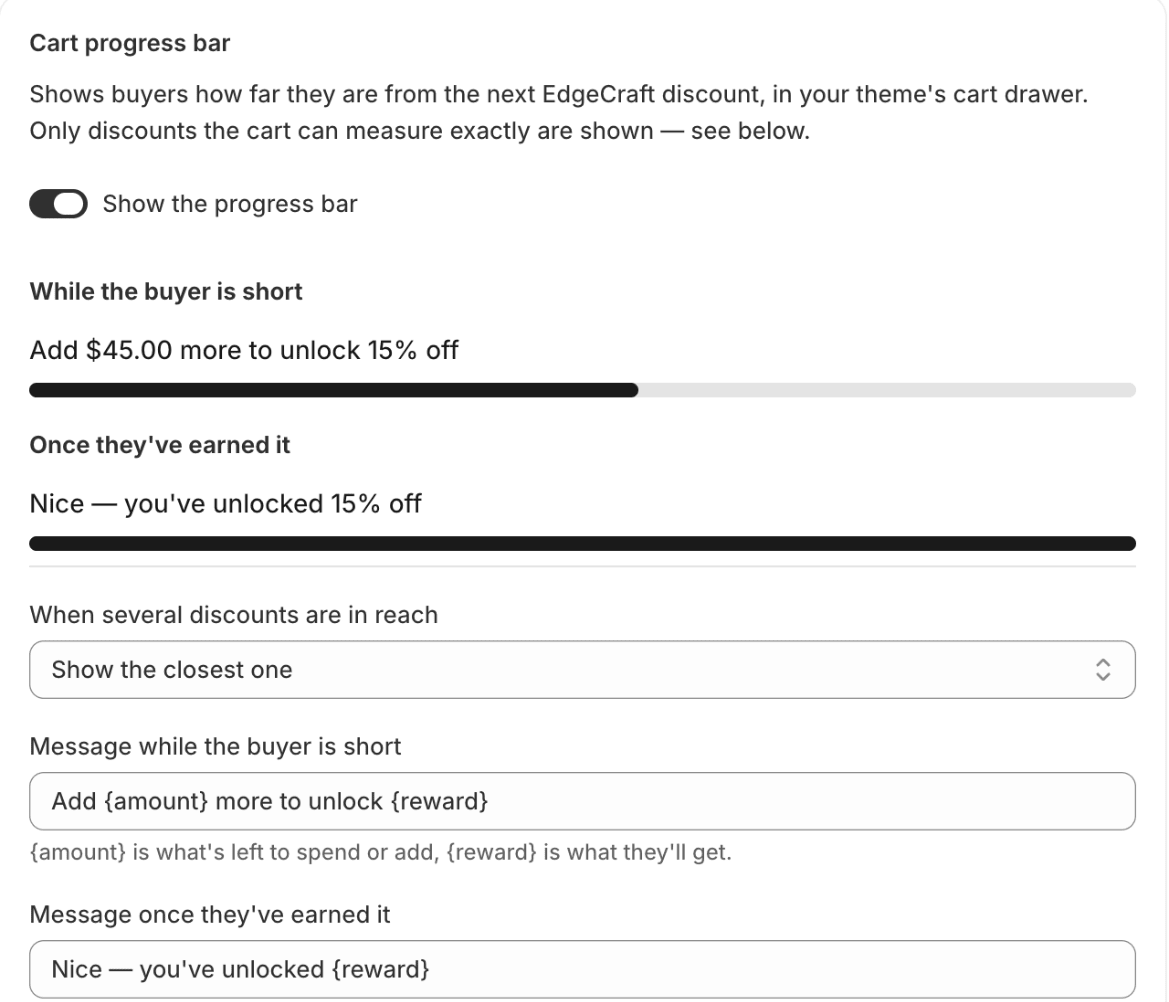
The {reward} wording follows the scope you chose: "free shipping" for all rates, "free standard shipping" for the cheapest rate, and the first rate's name for specific rates.
Check it: the cart and checkout agree
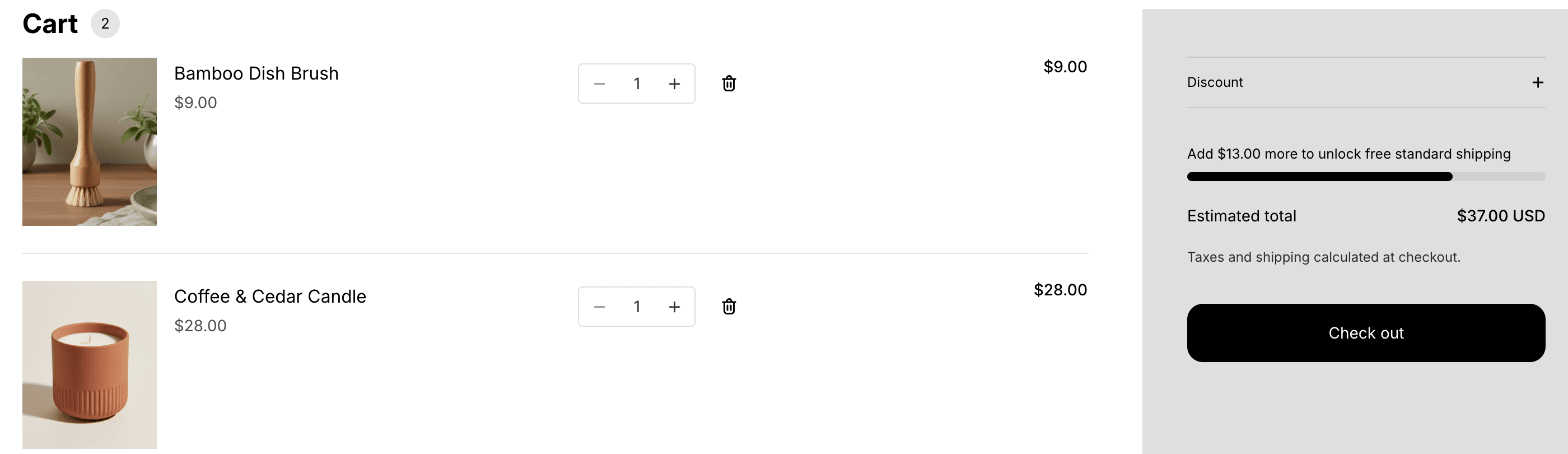
Here is one cart on our demo store (Horizon theme), with the $50 threshold and Cheapest shipping rate only. At $37, the bar reads "Add $13.00 more to unlock free standard shipping", which is the threshold minus the cart's qualifying subtotal:
Raise a quantity until the cart qualifies. When no other EdgeCraft discount is in reach, the bar shows the earned message. When another one is, it moves on to that goal. On our demo store a tiered spend discount starts at $100, so at $55 the bar moved on to "Add $45.00 more to unlock 5% off":
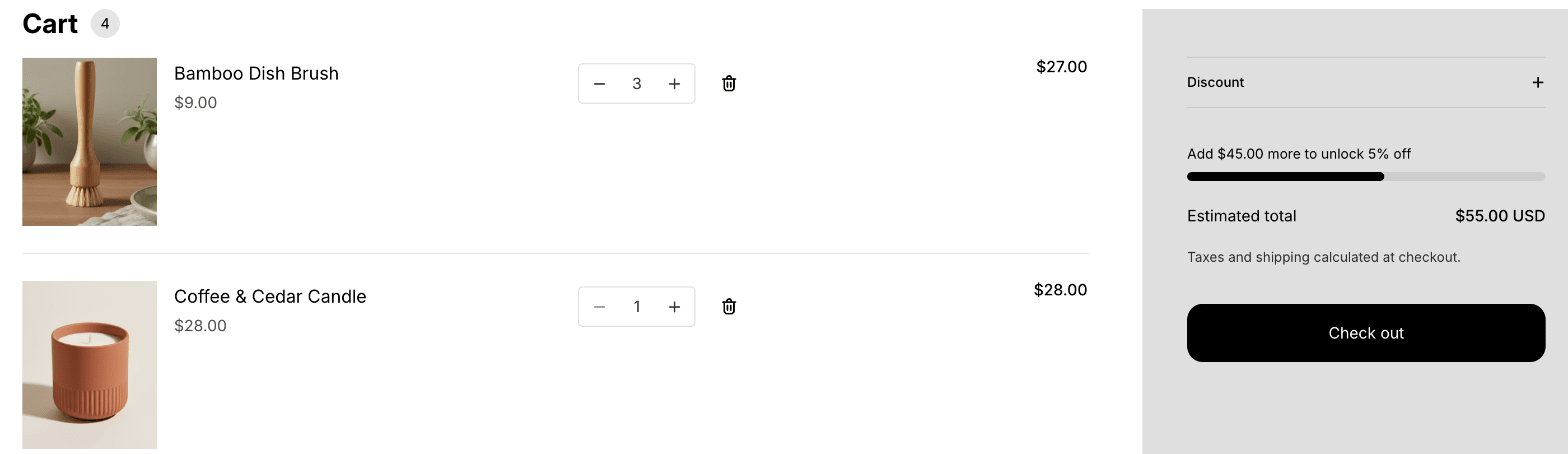
Then go to checkout and stop before payment. Once the shopper has entered an address and rates are available, the $55 cart's Standard rate reads $8.00 struck through and FREE. Express stays at $15.00, because this discount frees only the cheapest rate:

Back at $37, checkout charged Standard $8.00. That's what the bar is designed to do. To check your own store, build a cart just under and just over your threshold and read the shipping line at checkout each time.
With a spend tier too
If you also run a spend discount, such as a tiered spend discount, the bar shows one goal at a time, as the $55 cart above did. Under Settings → Cart progress bar → When several discounts are in reach, choose Show the closest one or Show the biggest reward.
Limits worth knowing
- The bar leaves some discounts out. A free shipping discount with excluded collections isn't shown, because the cart can't tell which products are in a collection and the bar would promise something checkout might not give. Free shipping that depends on the delivery address or a subscription in the cart is left out for the same reason. Settings lists any discount the bar is leaving out, with the reason. Excluded products are fine.
- Shipping discounts don't stack. Shopify applies one shipping discount per order. When discounts can't combine, Shopify applies the best one for the cart.
- EdgeCraft's free shipping is automatic only. There is no code version.
- It applies once rates exist. The discount takes effect at checkout, after the shopper has entered a shipping address and rates are available.
- Renamed rates. With Specific shipping rates, renaming a rate in Shopify stops the match until you update the name (capitalization and extra spaces don't matter). All shipping rates isn't affected.
- Shopify's 25. Every automatic discount, native or from an app, counts toward Shopify's cap of 25 active automatic discounts. EdgeCraft's Pro plan adds no limit of its own, but Shopify's remains.
- Other shipping types: Percent off specific shipping rates and Flat amount off shipping (both Starter) are separate EdgeCraft discount types.
FAQ
Does it work in other currencies? EdgeCraft's discount converts the threshold with the same exchange rate checkout uses, so a $50 threshold means the same spend in every currency. Our demo store sells in one currency, so this page doesn't show the bar in a second one.
What about local pickup, and "cheapest only"? Cheapest shipping rate only skips local pickup and pickup points, because they're usually free already. If a rate is already $0, it can still be the cheapest; the discount then changes nothing.
Do gift cards count? In EdgeCraft, no. In Shopify's free shipping discount, gift cards a customer buys count toward the minimum, while gift cards or store credit used as payment don't affect it.
Can I run it with a discount code? In EdgeCraft this discount is automatic only. In Shopify, a free shipping discount can be a code; a customer can use up to 5 product or order discount codes and 1 shipping discount code on one order.
Install EdgeCraft free
If shoppers should see how far they are from free shipping, you can try the app on the Free plan: Install EdgeCraft free.
For the whole map of what Shopify does natively, see Shopify discounts vs discount apps.
More on the pieces used here: Free shipping over threshold, App settings, and Add EdgeCraft to your theme.